New article
Recently updated
Customer Care Response Bands & Escalation Process

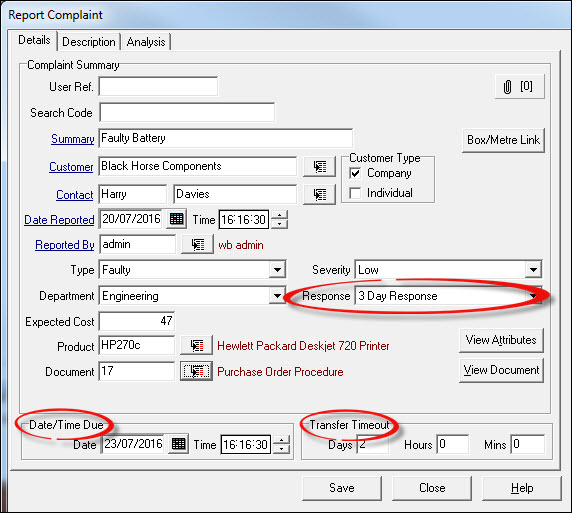
Once a Complaint has been reported, a Response Band can be selected to apply to the Complaint as soon as the Complaint has been assessed. This is used to send automatic transfer requests to nominated users. The person Assessing the Complaint may decide on the Response Band at the time of Assessment. This action will start a 'ticking clock'.
The clock is ticking on two counts; for staff to request help by asking for a transfer of ownership and for the time allowed to resolve the problem before it is escalated. Up to 100 different bands can be created and should be given a weighting, the lowest weighting being the starting point. A complaint can be given a response setting anywhere on the scale and will progress from that point upwards governed by the weighting rule. An example of response banding is shown below;
| Response Band | Weighting |
| Urgent | 95 |
| 1 - 4 Hours | 80 |
| 24 Hours | 50 |
| 3 Days | 40 |
| 7 Days | 30 |
NOTE: a unique weighting has to be assigned to each Response Band.
Setting up Response Bands
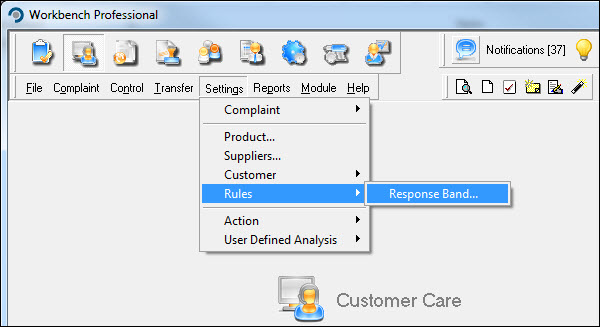
From the Customer Care module select [Settings] [Rules] and [Response Bands].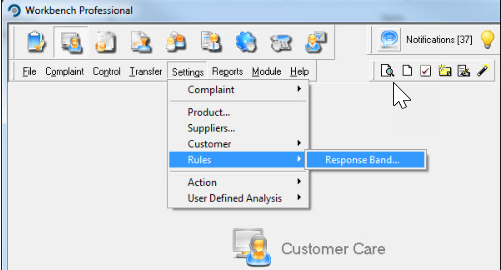
Press [New] and complete the relevant fields. Those that are Mandatory are blue underlined text;
- Description - a name by which the Response Band will be referred to.
- Weighting - used to index the response bands; when a complaint is escalated, the complaint moves from the initial response band to the one with the next highest weighting.
- Time Allowed - the amount of time that the complaint is allowed to exist at this response band before being escalated.
- Transfer Timeout - the amount of time that complaint or action transfer requests are allowed to exist before being marked as invalid. This time must be less than the Time Allowed value.
- Transfer Request Users (on escalation) - select the users who should be given the opportunity to take over the ownership of the complaint by means of complaint transfer requests.
- Notification Users (on escalation) - select the users who should be notified that a complaint has entered a specific response band.
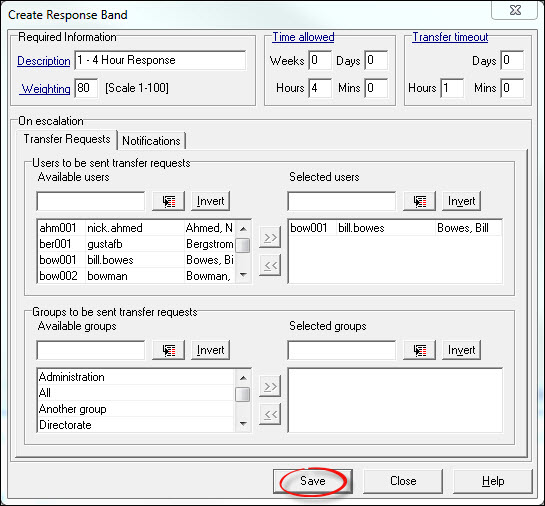
Press [Save] and repeat the process for additional Response Bands, or press [Close].
Examples of the use of Escalation would be: -
A company receives a complaint at the Sales Staff level. Once it has been assessed the owner would have 3 calendar days to resolve the issue after which time it is automatically escalated to their supervisor who has 24 hours in which to take over ownership and deal with it. Failure to complete in this time will result in the supervisor’s manager being informed. Ownership will stay with the supervisor until it is taken over by one of the people on the escalation list. That person may have 4 hours to resolve the complaint before it is again escalated.
NOTE: Ownership of the complaint remains with the original owner until accepted by the next person.
To illustrate how response bands work, think of three different bands - Bronze (weighting 10), Silver (weighting 20) and Gold (weighting 30).
A complaint is reported and is set to response band Bronze. Nominated potential transferees are informed and are given the time allocated in the Transfer Timeout box to respond. If the complaint isn’t dealt with during the Bronze band specified time allowed, it is escalated to the next band up - Silver. The escalation is recorded in the History log of the complaint as ‘Event escalated to response band Silver’. On escalation to a new response band a new due date/time is calculated; this is done by adding the old due date to the new response band time allowed plus the new transfer timeouts.
At the same time, transfer requests are sent to users nominated in the Silver band list who are given the specified Silver Transfer Timeout time to either accept or reject the complaint. The first accepter of the complaint becomes its new owner. If the complaint is neither accepted nor rejected by any of the nominated users within the transfer timeout allowed, the complaint owner remains unchanged. If the complaint is not dealt with by its owner in the time allowed (as allocated by the response band) it is escalated to the next band up - Gold.
Users who have been nominated on the Gold list will be sent transfer requests and will be given the transfer timeout set in Gold to respond. If the complaint is accepted by one of these other users, they then become the owner of the complaint and have the remainder of the time allowed in which to deal with the complaint.
This process repeats until the top numerical response band has been reached. If the complaint is not dealt with during the time defined for the top band, the field is cleared and there is an entry in the History log ‘Event escalated at highest response band’.
When a complaint is escalated at any level, the current owner is always filtered out of the list to be sent transfer requests although they can be sent notifications.
Each escalation is recorded in the history log as ‘Event escalated to response band <xxxx>’.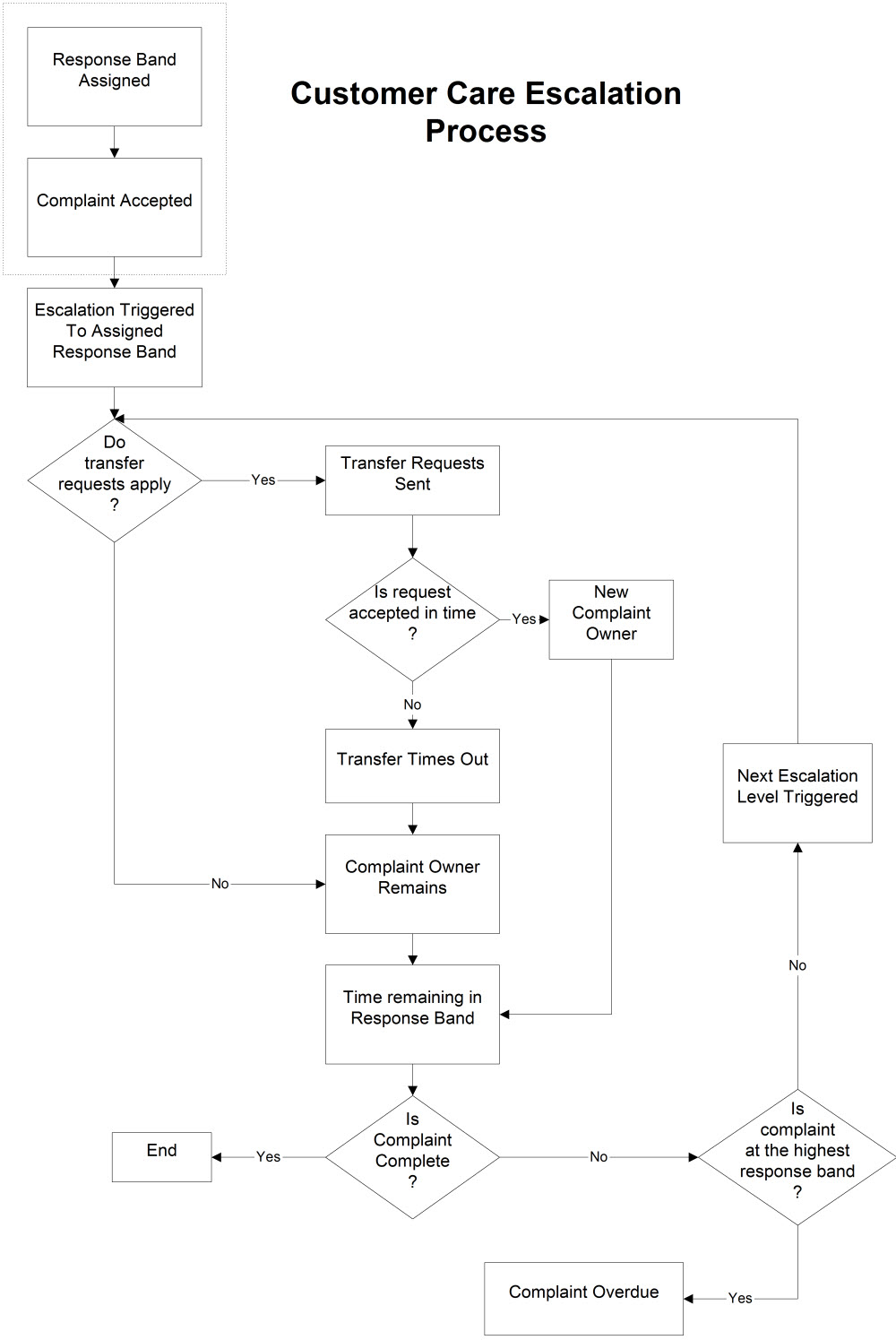
- Response Band Assigned - can be assigned at Report Complaint/Report Assessed Complaint/Assess Complaint stage.
- Complaint Accepted - escalations do not apply to rejected complaints. Stages 1 and 2 can occur simultaneously or independently.
- Escalation Triggered - when the Complaint is accepted, the escalation is triggered to the Response Band Assigned at stage 1. The timing for the escalation is taken from the time the complaint was reported. Therefore if a complaint was reported at 10am, assessed at 10.15am, with the time allowed in that response band set at 1 hour, the complaint will escalate at 11am if not complete.
- Do transfer requests apply? transfer requests are not mandatory. This allows for a complaint to escalate without asking other users to take ownership of the complaint.
- Transfer Requests sent - if transfer requests are allocated within the response band the complaint escalates to, then all users will be sent a task at the time of escalation to ask them if they wish to take ownership of the complaint. The time allowed for transfer requests to be accepted is defined in the response band, and must be less than the time allowed.
- Is request accepted in time? - the first user who accepts the complaint becomes the complaint owner.
- New Complaint Owner - the complaint now belongs to a different user.
- Transfer times out - if none of the transfer requests are accepted within the allocated time, then the tasks sent to the potential new owners are marked as superseded and they can no longer accept the transfer request and therefore become the owner of the complaint.
- Complaint Owner Remains - if either transfer requests are not used, or the transfer requests have timed out, the complaint owner continues to be the complaint owner at stage 2.
- Time Remaining in Response Band - the time remaining in the response band depends on when the transfer request (if applied) was accepted. If for example the time allowed in the response band is one hour, the new owner will have one hour, less the amount of time it took for them to accept the complaint to complete it.
- Is complaint complete? - a complaint can only be completed when all actions (if any) assigned to it have been completed.
- End - If the complaint is completed, within the time allowed in the response band, the process of escalation ends.
- Is complaint at highest response band? - if the complaint has not been completed, and there are response bands of a higher weighting set, the process of escalation will start again.
- Next Escalation Level Triggered - the system will calculate the next weighting level from the response band currently in use and the settings as defined in the next response band are used to repeat the process.
- Complaint Overdue - if the complaint has been through the escalation process and has not been completed in any of the times allowed in the response bands, the complaint becomes overdue. There will be a log in the history of the complaint to state that the complaint was escalated at the highest response band. The owner of the complaint may still take the complaint through to completion even though it is overdue.
Using the Response bands
When reporting a complaint, ensure that the 'Response' field is completed. This will populate the 'Date/Time Due' and 'Transfer Timeout' fields with the values specified in the Response Band set-up.