


New article
Recently updated
Types of Workbench Licenses

System
A system license allows a user access to all modules and areas of the software, as defined by the access level assigned to them via the Administrator. For example, if they have been granted access to just the Document Control module and specific routines within, this is what they will be able to do. Alternatively, if a user is given access to all areas of all modules, the license will allow them full access.
This type of license is suitable for Administrators or those users who need to interact with the software, e.g. create documents, process nonconformities and complaints etc. It also provides access to the core (Personnel and System Manager) modules.
Workgroup
Workgroup Licenses are limited in functionality, allowing the user to;
- Respond to Tasks
- Read Notifications
- View Issued Document
- Modify User Preferences
- Modify Workstation Settings
- View Help Files
The [Module] menu will be visible, but all options within are 'greyed out'.
This type of license is suitable for users who do not need wide access to Workbench and just need to view issued document and respond to their tasks.
A workgroup license can be 'forced' if the user ticks the Limited Access box when logging in.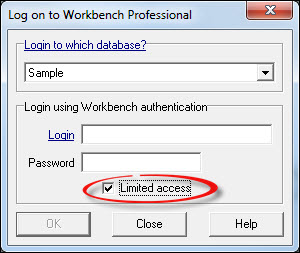
Module
Module licenses allow access to a specific Workbench module only and consist of;
- Document Control
- Audits
- Customer Care
- Nonconformities
- Test & Calibration
- Training
- ReportQuest
Only those modules licensed will be available for selection from the [Module] menu.
Workgroup and Module licenses must be used in conjunction with a System License (one is supplied with the software) as this is what is used by the Workbench Administrator to set up the system.
Intravista utilises Workgroup licenses. When all are used, it will proceed to use System licenses.
IntraVista Professional utilises System Licenses.