New article
Recently updated
Carrying Out a Non-Conformance (NCR) Final Review

Instead of a NCR moving directly from the Corrective Action sign-off to NCR sign-off stage, the intermediary 'Final Review' phase allows a NCR to be fully reviewed before sign-off.
All Corrective Actions assigned to a Non-conformance must have been signed off before this stage can be completed. However, further actions can still be created at this point and these will supersede the Review phase until they too have been signed off. The owner of the NCR will then review the NCR and all the actions raised, ensuring the original issue has been addressed, and further occurrences should not arise, (corrective and preventive actions), and then mark the NCR Ready for Sign-off.
Depending whether Business Rules are used, Final Review can also be carried out from the Tasks box. For the purpose of this article, the menu items are used.
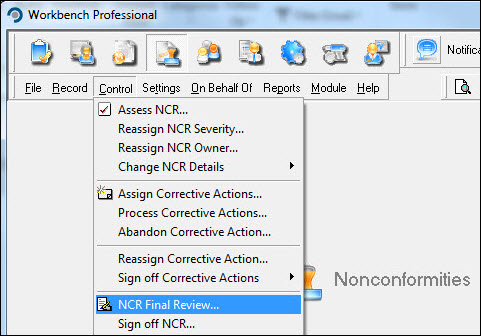
From the Nonconformities module, select [Control] [NCR Final Review...] from the menu.
Highlight the NCR from the list displayed in the "Select NCR for Final Review" window and press [Select].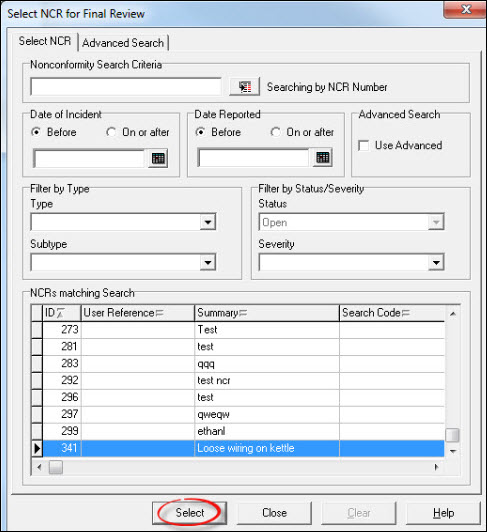
Review the NCR details including action information. Courses can be scheduled at this point, via the [Schedule Course] button, and do not take effect until the NCR has been marked ready for sign-off. Assuming no further action is required press [Ready for Sign-off].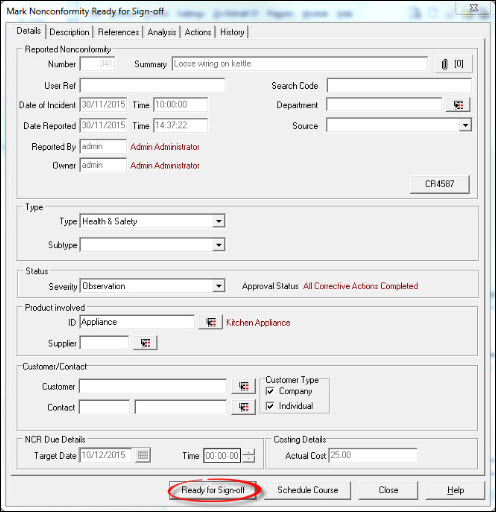
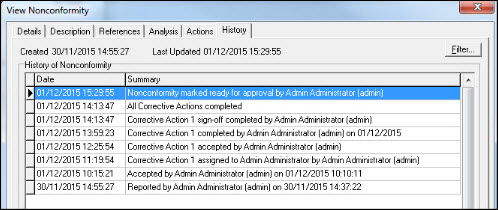
Select another NCR for Final Review or press [Close] to return to the Workbench Desktop. Historical information is written to the NCR History (viewable from [Record] [View NCR...]), for audit purposes.