


New article
Recently updated
Fix for Cannot find Mail Input file

Before carrying out this procedure, you will need to be logged onto a client machine as a Local Administrator (or a user who has Write permissions to the registry).
On a client machine run the Registry Editor [Start | Run and type regedit, then press Return].
Start by navigating to the following key:
HKEY_CLASSES_ROOT\eqmfile\shell\open\command
In the right-hand window, double-click on [Default].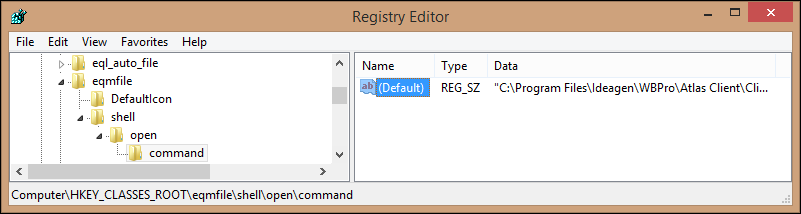
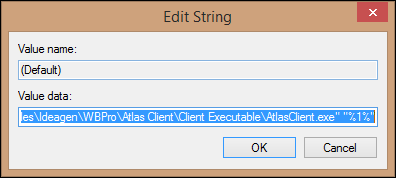
You will need to add a space and then "%1%" to the end of the path and Click [OK] to save.
To make sure, close Outlook and Workbench, then start Workbench and send a test mail. Open Outlook and double-click on the EQM attachment, it should now work and not display the error message.